Example n.7 - DataBase Support
Previous  Top 

We modify the preceding example for showing how interfacing the application with external database.

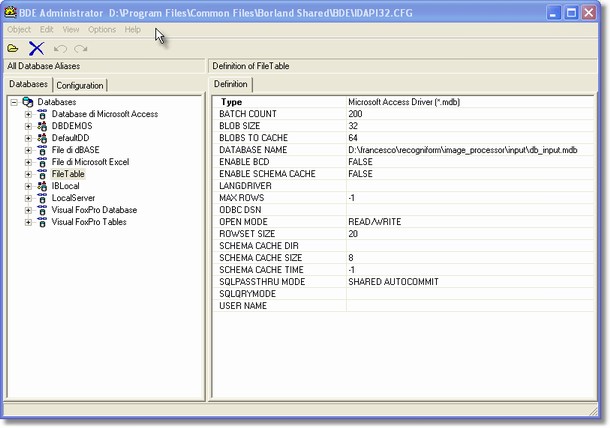
The first thing we have to set is the connection to the database; in the scirpt code we have to provide a database alias to function that manages table access and editing, so we need create it through BDE Administrator, that is in Control Panel of Windows operating System.
tut7

From Object Menu, we can create a new connection, creating an alias, for example, for a MS Access database.


//extract file name
name:=ExtractFileName(_CurrentInputFile);

// Updating log with description of next operation
ApplicationLog( _CurrentAgent, 'Image Skew and Deformation Correction Using Black Borders...' );

// Apply SKEW AND DEFORMATION CORRECTION on the image 
// Range: -5/+5°
// Background: Black

LeftAngle:=ImgFindSkewBlackBorderLeft( _CurrentImage, 5.0, True);
TopAngle:=ImgFindSkewBlackBorderTop( _CurrentImage, 5.0, True);
RightAngle:=ImgFindSkewBlackBorderRight( _CurrentImage, 5.0, True);
BottomAngle:=ImgFindSkewBlackBorderBottom( _CurrentImage, 5.0, True);
if ((LeftAngle>=0) and (RightAngle>=0)) or
   ((LeftAngle<=0) and (RightAngle<=0)) then
 begin
  if Abs(LeftAngle)>Abs(RightAngle) then HorzAngle:=LeftAngle else HorzAngle:=RightAngle;
 end else HorzAngle:=0.0;
if ((TopAngle>=0) and (BottomAngle>=0)) or
   ((TopAngle<=0) and (BottomAngle<=0)) then
 begin
  if Abs(TopAngle)>Abs(BottomAngle) then VertAngle:=TopAngle else VertAngle:=BottomAngle;
 end else VertAngle:=0.0;
ImgCorrectDeformation( _CurrentImage, HorzAngle, VertAngle, True );


//open table: first parameter is DSN, second parameter is name of table
table:=TableOpen('FileTable','FilesList');

//ordering table according to Filename field
TableSetIndex(table,'FileName');

//search if in the table there is a record about the current file
TableFindNearest(table,name);

found:=TableGetFieldByName(table,'FileName');

If  found<>name Then
Begin

//It sets the table insert mode   
TableInsert(table);  
 
//It stores the field value in a new record  
TableSetFieldByName(table,'FileName',name);  
TableSetFieldByName(table,'HorizSkew',FloatToStr(HorzAngle));  
TableSetFieldByName(table,'VertSkew',FloatToStr(VertAngle));  
 
//It confirms the table change   
TablePost(table);  
End
else
begin
   //updating current record
   TableEdit(table);
   TableSetFieldByName(table,'FileName',name);  
   TableSetFieldByName(table,'HorizSkew',FloatToStr(HorzAngle));  
   TableSetFieldByName(table,'VertSkew',FloatToStr(VertAngle));  
 
   //It confirms the table change   
   TablePost(table);  
end;  
 
TableClose(table);  

ApplicationLog(_CurrentAgent,'Correcting Border Deformation for ' + name);


The first part of the script is similar to the preceding example.

In the second part we added code that reaches an external table and records file data. The function TableOpen returns a handle to the table, it requires the alias of the database we've defined by DBE and then name of the table in the database.

Passing table handle and the name of a field to TableSetIndex, it put the table in order according to given field; in our example we want to order records looking at 'FileName'.

TableFindNearest requires table handle and a string parameter that is the target of search; according to the field we set using TableSetIndex, it'll will search the nearest record to the target we've passed. In particular, it compares the target and the value of the order field for each record, finding the nearest the target. After calling this searching function, the reading cursor of the table points to the found nearest record.

GetFieldByName, receives the table handle and the the name of a field and it returns the value of the current record in that field. In our example, after searching procedure, the current record is the nearest the target according to order field.

By default a table it can be only read, so if we want to write, we have to use a specific function that open table to writing; in particular, TableInsert allows inserting a new record, TableEdit allows modifying the current record. It's important to stress that if we move the cursor from the current record after using the above functions, table will return in only-read mode.
We can easily understand that in the script, if the found record has the same file name, we'll only modify it; if current record is different and then the file is not in the table; we will create a new entry. TableSetFieldByName allows us to set a value in a specific filed; it requires the table handle, the field name and the new value we want to write.

After writing or modifying a record, it's very important to use TablePost, for fixing new values in the source table (it's similar to commit command in dbms).

the final step is calling TableClose, that releases to the system the resources managed by the table handle.