The CHR parameters dialog allows to specify recognition settings for cursive handwritten recognition.
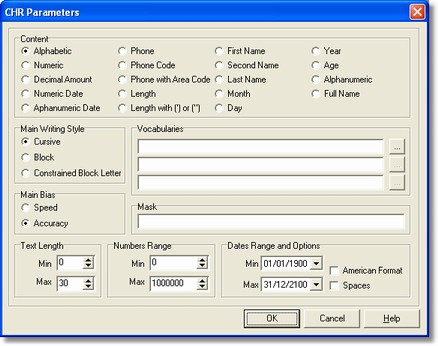
How to get it
From Fields menu select the Processing command after selecting a CHR field.
Options
| - | Content
|
- Main writing style
Set the writing style we expect to find in the field.
- Dictionaries
In this section you have to insert the dictionaries required to recognize alphabetics fields. Without dictionaries the recognition cannot happen. You can specifiy up to three different vocabularies, used in cascade.
- Main feature
You can decide if for you is more important speed or accuracy
- Mask
These following characters are used to define the mask:
D: (DIGIT) presence of a numeric character, namely, digits from 0 to 9.
U: (UPPERCASE) presence of an alphabetic upper-case character or a space.
L: (LOWERCASE) presence of an alphabetic lower-case character.
Notes
None.