Description
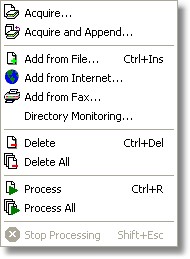
In Desktop Reader version, the Image menu allows to acquire, add, delete and recognize an image.
In Workgroup Reader version, in the Input Station application, the Image menu allows to do the same but instead then two processing commands is present just one single command.
In Workgroup Reader version, in the Correction Station application, the Image menu allows just to ask the server for the next batch to correct.
In Workgroup Reader version, in the Recognition Station application, the Image menu allows just to abort the current processing.
How to get it
Start the program. The Images menu lies into the application Main Window.
Commands
Acquire
Acquire and Append
Add from File
Add from Internet
Directory Monitoring
Add from Fax
Delete
Delete All
Process
Process All
Stop processing