Download Images from Internet Dialog
Previous  Top  Next

Description

The Download Images from Internet dialog allows to select connection parameters to download images from an Internet server using FTP protocol. This dialog is available only in Desktop Version and in Workgroup Reader - Input Station.
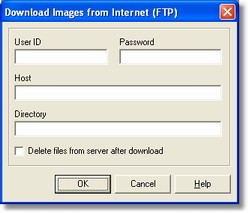
internetdialog

How to get it

Select the Add from Internet command from Images menu in the application Main Window.

Options

- User Id
The user name to use for server login.

- Password
The user password to use for server login.

- Host
The FPT server address to connect.

- Directory
The host directory where download image files

- Delete files from server after download
Selecting this option after downloading the files are removed form FTP Server. User need to have the proper rights to perform this operation.