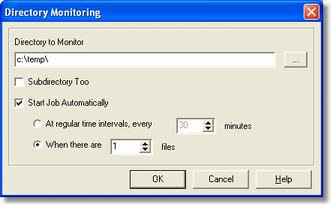
Directory Monitoring Dialog
Previous
Top
Next
Description
The
Directory Monitoring
dialog
allows to set parameters for directory monitoring allowing automatic import of files and automatic processing start. This dialog is available only in
Desktop Version
and in
Workgroup Reader - Input Station
.
How to get it
Select the
Directory Monitor command
from
Images menu
in the application
Main Window
.
Options
- Directory to Monitor
The direcotory where the system has to check periodically the presence of new files.
- Subdirectories Also
Option allowing to extend the monitoring to subdirectories of specified directory.
- Start Jon Automatically
Option allowing to start processing automatically when one of next conditions are verified.
- At regular time intervals, every X minutes
Selection this option the processing start automatically when are elapsed the specified minutes.
-
When there are X files
Selecting this option the process start automatically when the number of specified files is reached.