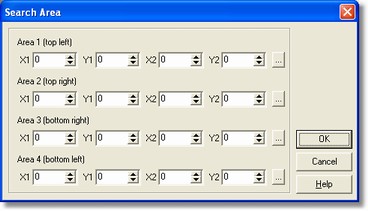
The Search Area Alignment Elements dialog allows to insert the coordinates to define the areas where the small square search has to happen.
How to get it
Select the New command and the Settings command from File menu, then Research Area button.
Options
| - | 1st Area (top left ): coordinates of the first vertex (X1,Y1) and the second one (X2,Y2) opposite to the first, both expressed in pixel, , these are essential to define the first research area.
|
| - | 2nd Area ( top right ): coordinates of the first vertex (X1,Y1) and the second one (X2,Y2) opposite to the first, both expressed in pixel, these are essential to define the second research area.
|
| - | 3rd Area (bottom right ): coordinates of the first vertex (X1,Y1) and the second one (X2,Y2) opposite to the first, both expressed in pixel, these are essential to define the third research area.
|
| - | 4th Area (bottom left ): coordinates of the first vertex (X1,Y1) and the second one (X2,Y2) opposite to the first, both expressed in pixel, these are essential to define the forth research area.
|
Notes
The button Search Area is not enabled if nor the small squares option is enabled from the dialog window Application settings.