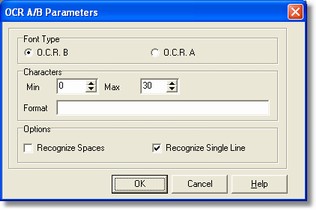
The OCR-A/B parameters dialog allows to specify controls for the standard OCR-A/B characters recognition (for instance, the ones used in the current account codeline, bank form, etc... and what's more the symbols #, >,<,+ e -).
How to get it
Select the Processing command from Fields menu after placing it on the OCR-B field.
Options
- Font Type
It presents the choice between two different characters type.
- Characters
It shows a characters range included between a least value and a max one: if the recognized characters are not included into the range, so the read data will be presented to the operator for any possible manual correcting. If you want always presented the field for the correction, the least and the max values have to be set so that, for instance, the least one is greater than the max and back.
These following characters are used to define the mask:
D: (DIGIT) presence of a numeric character, namely digits from 0 to 9.
N : (NUMERIC) presence of a numeric character, namely of the digits from 0 to 9 and some numeric symbols: +, -, *, /, #, >, <
U: (UPPERCASE) presence of an alphabetic upper-case character or a space.
L: (LOWERCASE) presence of an alphabetic lower-case character.
S: (STRING) presence of any numeric or alphabetic character.
/...:
For instance, the fiscal code format could be:
UUUUUUDDUDDUDDDU