Description
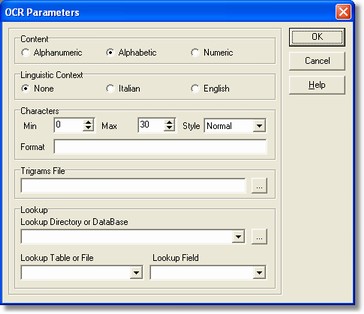
The OCR parameters dialog allows to specify checks for the machine-printed characters recognition.
How to get it
Select the Processing command from Fields menu after placing on the OCR field.
Options
Show the data type contained by the field: alphabetic (only letters), numeric (only numbers), alphanumeric (both letters and numbers) data.
It uses special and different linguistic analysis techniques in accordance with the language, that enable the words recognition with high care.
It is possible to specify these features.
Min and max indicate the characters number that can be recognized, out of such range the field enters correction.
The write style can be only in capitals (only upper-case letters), lower case (only lower case letters), normal (both uppers and lowers). For avoiding errors during the reading of the data, it is possible to specify for the read fields a format mask.
These following characters are used to define the mask:
D: (DIGIT) presence of a numeric character, namely digits from 0 to 9.
N : (NUMERIC) presence of a numeric character, namely of the digits from 0 to 9 and some numeric symbols: +, -, *, /, #, >, <
U: (UPPERCASE) presence of an alphabetic upper-case character or a space.
L: (LOWERCASE) presence of an alphabetic lower-case character.
S: (STRING) presence of any numeric or alphabetic character.
/...: presence of the following correct character.
For instance, the fiscal code format could be:
UUUUUUDDUDDUDDDU
(6 upper-case letters, 2 digits, 1 upper-case, 2 digits, 1 upper-case, 3 digits, 1 upper-case)
- Trigrams File
It permits to start the search way of the file containing the statistic information of every combination of three consecutive characters in the used language and assembled through the use some thousand words.
It allows to check the presence of the data into a table or a text file. It can be shown a database so a table and the top of this last; or it can be shown a directory (where its way must end with the character "\") and a text file.txt instead of the table (among the ones available into the list, inside of the directory).
Notes
None.