Description
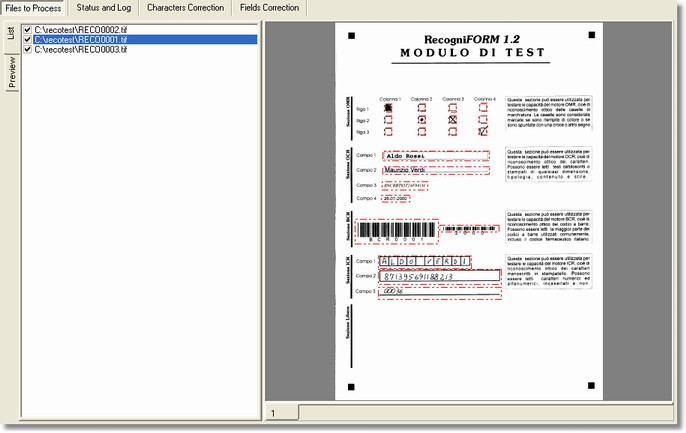
Files to work section is shown when the application starts; it allows to view the files (that have to be worked) list as well as the corresponding images.
This section is available non only in the Desktop Reader but also in the Workgroup Reader - Input Station, in Workgroup Reader - Recognition Station, in Workgroup Reader - Correction Station, and in Workgroup Reader - Output Station.
How to get it
Start up the application.
Content
The list of files to be worked is displayed on the left side of the screen, they are marked only after elaborating themselves. The list File menu (popup) is shown by clicking the mouse right button.
You can also see the images in preview mode, clicking on the proper tab.
The image of the selected file is viewed on the right side of the screen, that can be zoom in or zoom out through the commands from View menu.
If it is a multi-page file there will be some numerate tab for each page that composes it.
Notes
None.