Description
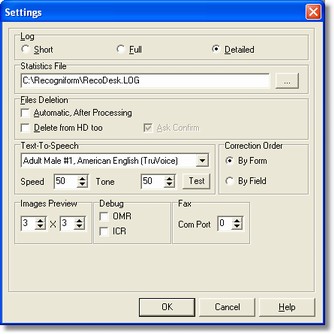
The Settings dialog allows to select some general options.
How to get it
Select the Settings command from the File menu of the Main Window.
Options
It is possible to establish all the information of the log process: namely, the Brief option shows minimal informations, on the other hand the Detailed option shows the maximum one.
- Statistics File
It is possible to get statistics of the whole job.
If it is selected the Delete from Disk option files will be deleted not only from the viewed list, but really too. It is possible, through the Confirm option, to get a message appeared to confirm the deletion.
- Text-to-Speech
It makes the check of those characters that have been recognized by the ICR engine through the audio board.
It can be set both the speed and the tone.
- Correction Order
The order to use in correction phase. By Form is usual order and By Field allows to correct all fields of a type in all the forms, then go to next filed type and so on.
- Image Preview
It allows to specifiy the numeber of images per row and per column in preview page.
- Debug
By enabling the OMR flag, a window with the value of the field and the image appears on the video for each OMR field.
By enabling the ICR flag, a window with the value of the field and the image appears on the video for each ICR field.
- Fax
It allows to insert the serial port number where the fax-modem is installed.
- IP Server Address and Port
It allows to define the server IP address and port to use. This option is available only for client modules in version Workgroup Reader.