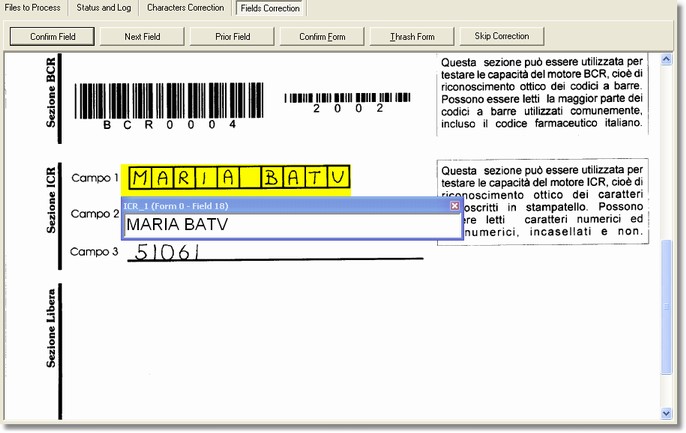
The Fields correction section is shown during the correction phase and after the possible verification phase.
This section is available non only in the Desktop Reader but also in the Workgroup Reader - Output Station.
How to get it
The program places itself automatically on this section if it necessary to correct some suspicious fields (namely they have not been successfully recognized) or if the application settings always involve this phase for a few fields. To get into this section it needs just to click on Fields correction in the main window.
Content
For each field to correct is shown the part of the image that contains it, opportunely zoom in and, at the same time, a text box with the read data is now displayed: so the user can edit or confirm the data.
-
Field confirm
The current field is marked as right and passes on the next one.
-
Next field
It passes on the next field without correcting.
-
Prior field
It comes back to the field previously corrected.
-
Confirm Form
The form is confirmed and every field is marked as corrected.