- OMR Technology
The OMR technology allows user to read the check boxes, that is the sign affixed in predefined spaces. The  power of this engine, compared to similar products, is the advantage of working with two operative parameters, evaluating the quantity of existing ink and the size of the sign in the box;
- ICR Technology:
 With ICR system it's possible to recognize manuscript data in unconstrained or constrained mode when there is usually space among characters. The engine has been expressly trained on the European and American writing style with an high accuracy.
- BCR Technology:
 The BCR technology allows the recognition of bar codes, decoding their content. It recognizes all the standard bar codes, enclosed the pharmaceutical ones.
- OCR Technology:
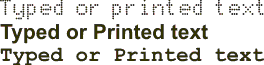 It's the recognition technology for printed and typed texts. It's omnifont and it can recognize characters having any font style and size.
- OCR-A Technology:
 This engine works on pre-printed OCR-A codelines of postal and banking documents;
- OCR-B Technology:
 This engine works on pre-printed OCR-B codelines of postal and banking documents;
- MICR CMC7 - E13B Technology:
 This engines works on pre-printed CMC7 or E13B check codelines.
- CHR Technology:
It allows user to read manuscript data in cursive written (natural writing not in capital letters): what was only imaginary a few years ago, now it's real. This feature is essential for reading forms that haven't been expressly designed for the automatic acquisition and contain unconstrained fields, freely written, without any tie.
- AMK Technology:
The AMR allows you to perform the assisted manual data-entry for data you can't or you don't want to read automatically;
- IDE Technology:
Through the IDE system it's possible to export page zones or whole pages in image format. It's very useful when you need to keep portions of forms containing signatures, sketches, drafts or other information, without modifying anything of their characteristics or structure.
Processing Steps
We can split the forms processing in 4 main steps: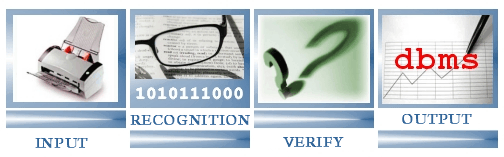
1. Input
2. Recognition
3. Verify/Correction
4. Output
A "zero" step, prior to the production itself, it's represented by the template definition. What is a template? A template is a "project" that contains all rules and information needed to read properly a specific kind of forms. (For example: the template contains the followforms ing information: read a barcode Code39 in the upper left of the form).
It's very simple to create and develop a template, using the very easy-to-use tool called Recogniform Application Designer (included in the software): just design with your mouse the fields area on the empty form, select the kind of data you need to extract (barcode, ocr, icr, omr, etc.) and that's all. Of course you can set a lot of functions and rules using a powerful scripting language that will let you feel really the "owner" of the software:discovering its flexibility and power you will soon
imagine a thousand of interesting opportunities.
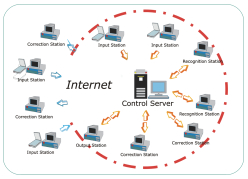
2. Recogniform Input Station
Recogniform Input Station is the application of Workgroup solution that allows to carry out the optical reading of documents acquired by various ways: scanner, fax, file, internet.
Recogniform Input Station allows you to import images in different ways:
- scanner
- files
- directory monitoring
- internet
- fax
You can use monchrome, greyscale or color images. In this last event the system can filter the colors that may interfere with the recognition.
2.1 Input from scanner
All TWAIN driver scanners are supported.
2.2 Input from files
Recogniform Desktop Reader allows to process previously scanned images anda saved in any TIFF format, compressed or not (CCITT G4, CCITT G3, Huffman, PAckbits, JPeg), single or multip-page, as well as in JPEG, BMP, PNG format.
2.3 Input by automatic directory monitoring (with sub-directories also)
You import files by directory monitoring, giving the start to the process automaically at pre-defined interval of time or when a certain nnumber of file is available in the folder.
2.4 Input from internet
You can download from any internet server via FTP with User and password. This means that you can acquire forms from a scanner sited in a different location.
2.5 Input from fax
Faax input is directly supported, without external applications.
3. Recogniform Recognition Station
Recogniform Recognition Station automatically ricognizes the batches ready for recognition. The power of Recognifom Desktop Reader is the possibility to work with the state-of-art Recogniform
recognition engines, that can be used togheter also on the same field. As described above, you can use the following engines:
- OMR
- ICR
- CHR
- OCR
- BCR
- OCR-A/B
- MICR CMC7/E13B
- IDE
- AMK
Images Pre-processing
An adequate preventive images elaboration increases the quality of the recognition process and reduces the files sizes, so we introduced a lot of functions covering every specific requirement.
- Deskew
Correction of the slope that sometimes is caused by the scanner when it feed with ADF.
- Black Border Removal
Removal of the possible black edges due to the excessive sizes of the scanning area.
- Form Alignment and Removal
Alignment of the form to compensate the horizontal and vertical shift;
Removal of the pre-printed elements when the form is not printed with blind-ink.
- Lines Removal
Removal of horizontal and vertical lines rebuilding the characters crossed by them.
- Despeckle
Removal of black isolated points and spots.
- Field Box Removal
Removal of the box delimiting a single field, if it is not printed with blind-ink.
- Character Box Removal
Removal of the box delimiting the single characters of constrained fields, if it is not printed with blind-ink.
- Color Inversion
Inversion of colours in case of white characters on dark background.
These cleaning functions can be used on the whole image or locally, defining the specific areas to be processed.
4. Recogniform Correction Station
Using a new validation and correction system, the major part of alphabetic fields can be verified and it's possible to solve automatically all doubts generated by ambiguous recognitions.
4.1 Trigrams
This system uses statistical information relative to all the possible combinations of three consecutive characters in the target language, analyzing some thousand of words: these combinations are called Trigrams are enclosed and ready to be used: in this way all the trigrams combinations, the allowed one and the forbidden
one, as well as their using frequency, are fully and clearly known. For example, if a recognition engine reads the word "SMITK", the system will correct this word changing it into "SMITH",
without operator's intervention and with no risk to give a wrong result. In fact, using a new technology called CREP® (Common Recognition Errors Proofing) and with the help of an Artificial Intelligence system, Recogniform Desktop Reader is
able to investigate all proofing combinations, selecting the most probable one. All this process takes place in full autonomy.
 4.2 E.B.V. (Eye Blow Verification®)
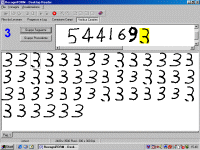
During the definition phase of the application, it's possible to get the manuscript characters or those coming from codelines (all of them or only the suspect ones, whose confidence level is under a specific parametric threshold) to be presented to an operator for a visual verification.Thanks to the Recogniform Technologies exclusive system called Eye
Blow Verification®, the operator is able to verify thousands of characters a minute with minimum effort and maximum accuracy. This system is based on the principle that, inside a group of similar elements, the eye is automatically attracted from the different ones. For example, if in a group of people, everybody suits a blue t-shirt except a person who has got a red t-shirt, the last one would be fast noticed without a detailed examination of
the whole group! According to these considerations, Recogniform Desktop Reader shows in the same context all the characters recognized and classified in the same manner, so the operator can immediately look and notice the presence of intruders
generated by wrong classification. In this way it's possible to find and correct all the possible errors of recognition
introduced by: not eliminable dirtiness, defects of scanning, ambiguity, etc. Also in case of ambiguous cases,Recogniform Desktop Reader instantly allows you to solve the problem, automatically recalling
on the video the image of the whole field.
4.3 Visual Assisted Verify
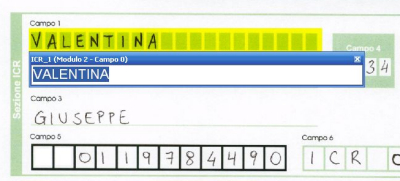
After the characters verification, the phase of fields correction starts, visualizing in the same context both data and the relative image, so they can be compared directly.
4.3.1 Text-to-Speech
To save time in comparison operations, we have added an option that allows user to listen read data from the computer, using the text-to-speech technology: in this way, instead of reading data two times, the operator can read just the data on the image, listening from the computer the read data.
4.3.2 Correction and Accuracy
It's possible to decide which fields need correction: all; only those whose level of esteemed accuracy is under a certain threshold; nobody. It's also possible to set for each field a different confidence level.
4.3.3 Normalization
Before being stored, the read data can be formatted in several ways, allowing the output to adapt to any necessity: conversion to uppercase or lowercase, empty spaces deletion, characters substitution, addition of suffix or prefix, etc.
4.3.4 Lookup tables and dictionaries
In addition to database formats and .txt files, you can also use compressed dictionary .dct for the look-up functions. These files are characterized by high speed of access, small memory consuming and don't need settings of alias, etc.
To create a .dct file, there is a specific utility that receives in input an ASCII file (a word for each row). Look-up speed is very high: hundreds of thousands of comparisons a seconds. Compression is around millions of words / Mb.
The following .dct dictionary are available fot the following countries (including first names, last names, zip codes, streets, towns, etc.) :
- Italy
- Belgium
- Canada
- Finland
- France
- Germany
- Gret Britain
- Holland
- Poland
- Portugal
- Spain
- Switzerland
- Turkey
- U.S.A.
- other countries available on request
Moreover you can easily create your personal dictionary.
4.3.5 Overlay
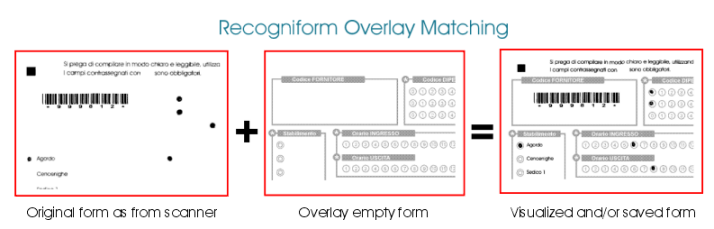
When you scan images with blind ink (red/green/blue) you may need to re-build the original image in order to get a perfect idea of the original form. This may be useful, for example, to correct check boxes fields. With Recogniform Reader you will be able to get an image with overlay, overlaying the black ink of the form scanned on a color/greyscale/black and white empty form.
5. Recogniform Output Station
Recogniform Output Station allows a flexible use of the recognized data thanks to the possibility of exporting them to the applications in different ways. It's possible to export data in three different ways: to databse, to file or to applications.


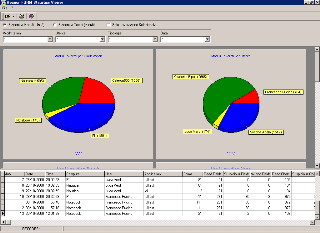 The information stored are: