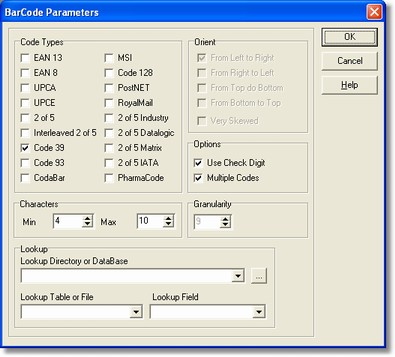
There are all codes that can be recognized. To get greater precision of recognition it is suggested to select the codes lower number.
-
Sorting
It shows the BarCode sort as to the page.
-
Options
It allows to calculate the BarCode control code.
-
Characters
It shows a characters range included between a min value and a maximum one: if the recognized characters are not included into the range, so the read data will be presented to the operator for any possible manual correcting. If you want always presented the field for the correction, the min and the max values have to be set so that, for instance, the min one is greater than the maximum and back.
-
Granularity
Parameter for the barcode search.
-
Lookup
It allows to check the presence of the data into a table or a text file. It can be shown a database so a table and the topof this last; or it can be shown a directory (where its way must end with the character "\") and a text file.txt instead of the table (among the ones available into the list, inside of the directory).