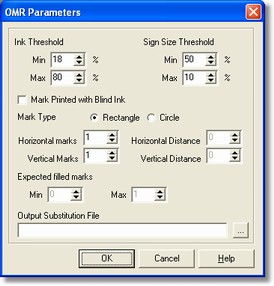
Description
The OMR parameters dialog enables to specify checks for the selection box recognition.
How to get it
Select the Processing command from the Fields menu after placing on the OMR field.
Options
It shows the percentage of pixel so that the box is considered as 'full'.
If the min. and max. values are not compatible, the option is disabled .
- Sign Size Threshold
If the box is not fill but checked with a sign, it is possible to specify the extension percentage. If the min and max values are not compatible, the option is disabled .
-Mark Printed with Blind Ink
If checked it means that the boxes are printed with blind ink.
It can have square or round shape; this is very important to calculate the percentage referred to the threshold of ink filling up.
- Horizontal marks
It shows the horizontal boxes number contained in the selected area
- Horizontal Distance (in pixel)
It shows the orizontal distance (in pixel) between the boxes.
- Vertical marks
It shows the vertical boxes number contained in the selected area
- Vertical Distance (in pixel)
It shows the vertical distance (in pixel) between the boxes.
- Expected filled marks
It shows the boxes number that could be marked (between a min and max value)
- Output Substitution File
It shows the path of the output substitution file that is used to compare the read value as well as translate it as to predefined correspondences.
Notes
None.