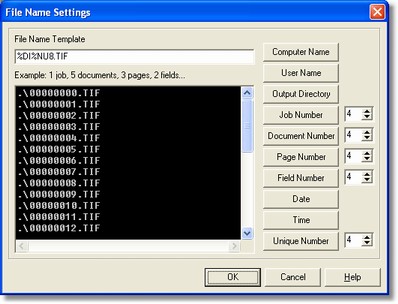
In this box is shown the buttons combination code chosen by the user.
-
Example of 1 job, 5 documents, 3 pages, 2 fields…
In this box is shown an example consisting of 1 job, 5 documents, 3 pages, 2 field, whit the information chosen by buttons.
-
Buttons
They allow to select the information inside the file. It is possible selecting several combinations in accordance with the user's requirements. Into the Template File Name box are viewed the codes which correspond to the buttons, while into the Example… box is shown the 'meanings'.
Notes