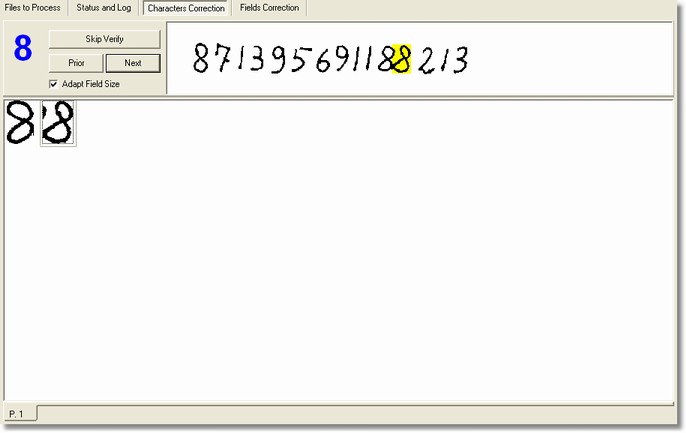
Description
The Characters Verification section is shown through the correction phase and allows to verify all the characters recognized by the OCR-B and ICR engines.
This section is available non only in the Desktop Reader but also in the Workgroup Reader - Output Station.
How to get it
The program lies itself automatically on this section after the automatic recognition phase, if the settings require the characters verification. However it is possible to move in this section by clicking on Characters Verification into the main window.
Content
This section is divided into three zones:
They allow to shift orderly the various groups. When the Next Group button is used, if there are no images in the next group, this last is jumped and move on the next one. On the left of the buttons is shown the characters corresponding to the images of the group.
- Image
It is the image zone refers to the whole field that contains the verifying character. The whole view of the field is useful in some uncertain cases so as to refer to the context in which the character lies, for instance, to distinguish a O (of Ocean) from a 0 (zero). The character to be verified is yellow-coloured.
It is the zone that takes large space into this section and contains the images of those characters that have to be verified. Every image has to correspond to the blue character on the top left side. If one of these characters doesn't correspond then it is possible to edit it simply by clicking the mouse left button. Finally, the Verify popup menu appears by clicking the mouse right button.
Notes
None.